Consult this chapter in case of unexpected behaviour or if you suspect a product fault.
The correct troubleshooting and support process is to first consult the common issues as described in this document.
If you experience problems with VictronConnect, first consult the VictronConnect manual, especially the troubleshooting chapter.
Should all this fail to resolve the issue, scan through popular questions and answers regarding your product and ask the community of experts in the Victron Community In case the problem persists, contact the point of purchase for technical support. If the point of purchase is unknown, refer to the Victron Energy Support webpage.
The DC/DC charger does not power up
With a normally working DC/DC charger powered on and operational, the controller LED(s) - check the LED Indicators - will illuminate or blink and can communicate the charger status and battery voltages via VictronConnect. This is not possible with a device that does not turn on.
If the device does not power up, use the following steps to check why the charger is not operational.
Check for mechanical damage to its housing and input/output terminals.
If there is mechanical damage, this is probably the cause of the problem.
Check the device for burn marks and a burning smell.
If there are burn marks, this is probably the cause of the problem. Note that the device is potted; therefore, there may be some smell if it gets warm/hot while charging.
Measure the battery voltage directly at the charger's battery terminals with a multimeter to rule out possible problems with the wiring, fuses and/or circuit breakers in the path between the battery and charger.
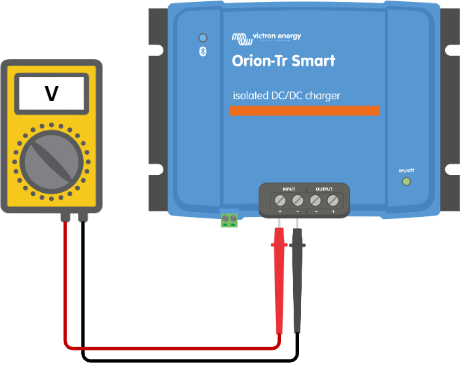
Depending on the result of the measurement, do the following: -
Battery voltage | Operational state | Action to take |
|---|---|---|
No voltage | Off | Restore the battery supply: - check external fuses - check for loose wires and damaged cables - check for bad crimps and pull-test the wires |
Correct voltage | Off | There might be a fault with the charger. Contact your Victron dealer or distributor. The charger was accidentally connected with the battery polarity reversed (see Polarity check before connecting the battery, not covered under warranty). Replace the charger. |
Correct voltage | Off because the remote link is not connected | Restore the remote link: The minimum requirement for the remote on/off terminal is a wire loop between the L- and H-pins. If a BMS controls the Orion's remote on/off, ensure this connection works as outlined in Remote on/off wiring. |
Reasons why the battery does not charge are:
Issues with the battery or system wiring
Incorrect settings, such as battery settings, input voltage lock-out and engine shutdown detection
A BMS or other device remotely controls the Orion Smart via its remote on/off
If not controlled by its remote on/off, it is missing the wire loop between L- and H-pin
First, check if the VictronConnect app shows on the status page why charge is disabled.
VictronConnect message | Action to take |
|---|---|
Remote input inactive | Consult the Remote on/off wiring and check the wiring. Check the terminal block for the remote on/off function is plugged in. Check for continuity if a wire loop or simple switch is used between L- and H-pin. If a BMS controls the remote input, ensure the ATC connection works. |
Disabled in settings | Enable the charger in the battery settings. |
Input voltage lock-out | See step 3. |
Engine shutdown detected | See step 4. |
1. Check the battery wiring for damaged cables, loose connections, bad crimps or a blown battery fuse. Are the wires stripped to the correct length and tightened with the correct torque?
What to check | Action to take |
|---|---|
Are you using the correct cables, and are the wires stripped to the correct length, tightened with the correct torque and making good contact with the plug/terminals? | |
Are there any burn marks on the terminals, or are the cables or connectors molten? | Replace the device. This damage is usually not covered by warranty. |
2. Check the battery settings in the VictronConnect App. Incorrect battery settings can cause the charger to switch to absorption or float charging prematurely. The battery is then not fully charged.
Description/Symptom | Action to take |
|---|---|
The battery does not get fully charged. | Check the absorption voltage in the battery settings and ensure it is set to the values the manufacturer recommends. See Charger Mode - Battery Settings. Make sure Charger mode is enabled in the settings. The power supply mode does not follow any charging algorithm, and the output voltage might be set too low. |
The battery does not get fully charged, but the Input voltage lock-out is enabled, and the input voltage is below the lock-out value. This is accompanied by the message "Charge is disabled due to: Input voltage lock-out" on the status page in the VictronConnect app. | Ensure the input voltage is above the restart value or disable the input voltage lock-out feature in the settings. See Charger Mode. |
VictronConnect shows an output voltage higher than that of the charged battery as measured with a battery monitor or DMM. | In general, the voltage measured at the output of the charger is always higher than that of the battery connected to that output as long as a high current is flowing. However, a bad connection between the output and the battery terminal can lead to the same symptom. Check step 2 again and ensure the lowest possible resistance for all connections. |
3. Check the engine shutdown detection settings in the VictronConnect App. Incorrect engine shutdown detection settings can result in the battery not being charged.
Description/Symptom | Action to take |
|---|---|
The battery will not charge because the start voltage value is too high for the selected alternator type (never reaches this voltage). This is accompanied by the message "Charge is disabled due to: Engine shutdown detected" on the status page in the VictronConnect app. | Lower the start voltage value and ensure the alternator supports it. See Engine shutdown detection setup with VictronConnect. |
The battery is not fully charged because the shutdown voltage is set too high and the charger stops charging prematurely. This is accompanied by the message "Charge is disabled due to: Engine shutdown detected" on the status page in the VictronConnect app. | Increase the shutdown voltage value. See Engine shutdown detection setup |
Was this article helpful?
That’s Great!
Thank you for your feedback
Sorry! We couldn't be helpful
Thank you for your feedback
Feedback sent
We appreciate your effort and will try to fix the article